
To add a signature to WordPress blog posts, you can manually insert an image and/or type out your text each time you create a blog post. But there’s a way to automatically have your signature added to the bottom of each and every blog post! This method involves editing your WordPress theme’s functions.php file. But don’t worry — I explain it step-by-step below.
Add a Signature to WordPress by Editing the Functions File in your Theme
The functions.php file is located within your WordPress theme’s directory: /wp-content/themes/yourtheme/
First download the functions.php file. You can do this through an FTP program — or through a File Editor feature of your web hosting account.
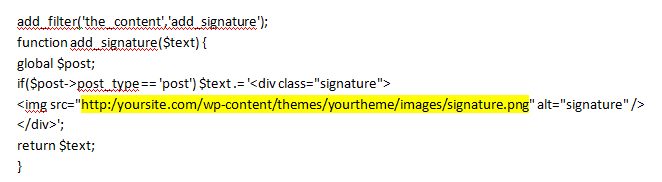
Open the file in a text editor (like Notepad) and insert the code found in this blog post found on wpmu.org. Replace the text for the image with the correct URL for where you signature image is located (see highlighted code here):
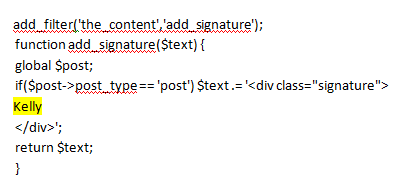
Or you can use text instead of (or in addition to) an image:
Save and upload the updated file back to your site.
If you need adjust the appearance of your signature you can add a CSS style to your theme’s stylesheet: /wp-content/themes/yourtheme/style.css. For example, to change the color or your text:
div.signature { color: #000000; }
And to add extra spacing around your signature image:
div.signature img { padding: 5px; } 


So much information to absorb. Thank you for sharing.
Wow this is awesome guys, thanks a lot for the information. Appreciate !!
Hi Kelly! I just created a signature image for my WordPress blog, but when I upload the file into my media library, the sides get cut-off. Any ideas why or how to fix this? Thanks!
Are the side getting cut off when you view it in your Media library? Or are they getting cut off when you view the signature at the bottom of your blog post?
I did just as you explained and it messed up my site, now my signatures and other txt are on the homepage and i tried to set the file back the way it was it its still there HELP!
What’s your website?
http://www.yourultimateliving.com/
Did you use the plugin — or did you edit your functions file?
(I gave 2 different sets of directions in this post.)
I edited the functions file. And i noticed that something was wrong with the way it is at the top of my page, and so, I edited the file again to put it back to original and after uploaded it doesnt appear it changed the file. Becuase the same one is still in there. And nothing went back to normal
It looks like you didn’t edit that file correctly. You’re missing the first “a” in the code.
Are you using a caching plugin — that may not be showing you the updated file?
Okay let me go and add the “a” and see if that works. I don’t know if i have a caching code(how would i know)…i use HostGator so i edited the functions.pho file there
Ok i added the “a” and the problem is still there……also i noticed in the file that it shows that code 2x one at the bottom of the page and another one a little more up the page….
You need to only include that code once in the file. Please remove the extra code.
Okay, I got my site back to normal…had to go to my downloded back up folder and get the original file. I must have made a few mistakes in paste the code. But with a fresh file and everything back to normal, i attempted to retry it, and made sure i did not leave out any characters,…i copied the code and pasted at the bottom of the file….then i went to Media on WP and clicked on my pic in the Library and copied the URL that was listed there and location http://www.yourultimateliving.com/wp-content/uploads/2017/02/Signature.jpg and replaced the code URL with my URl and it still did not work
Without seeing the code in your file, it’s hard for me to tell you what the issue is. How about trying to use the plugin instead? That way you don’t have to deal with the code.
Okay will the plugin enable me to use a pic?
Yes. You’ll need to use HTML and use the URL of that image you uploaded. Please see my instructions above that say “You can also use HTML code…”
amazing! Thanks for the help
Hello,
I did added this via editing the code. Is there a way to get the signature to not show up when I do a preview post with a “read more” button?
Thanks!
Most likely, yes. But I would need to dig into your code and see how you have your excerpts setup in order to give you specific instructions for how to fix this.